




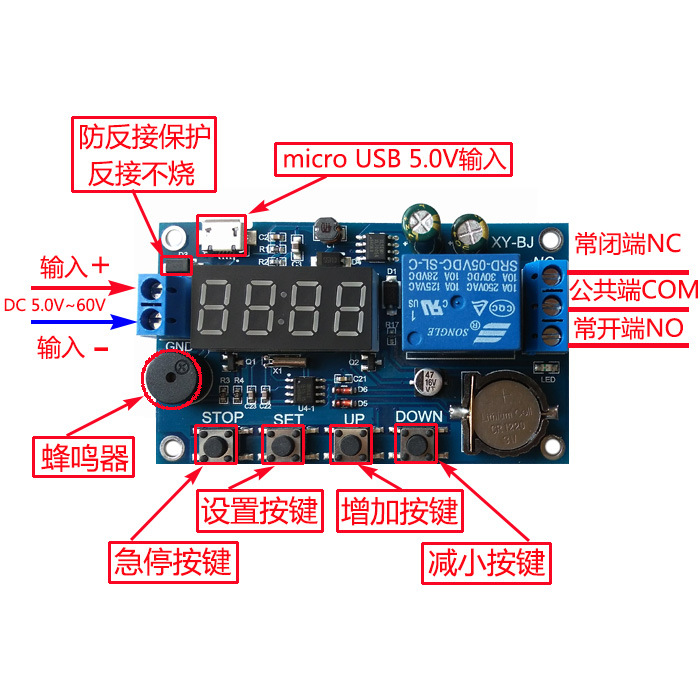
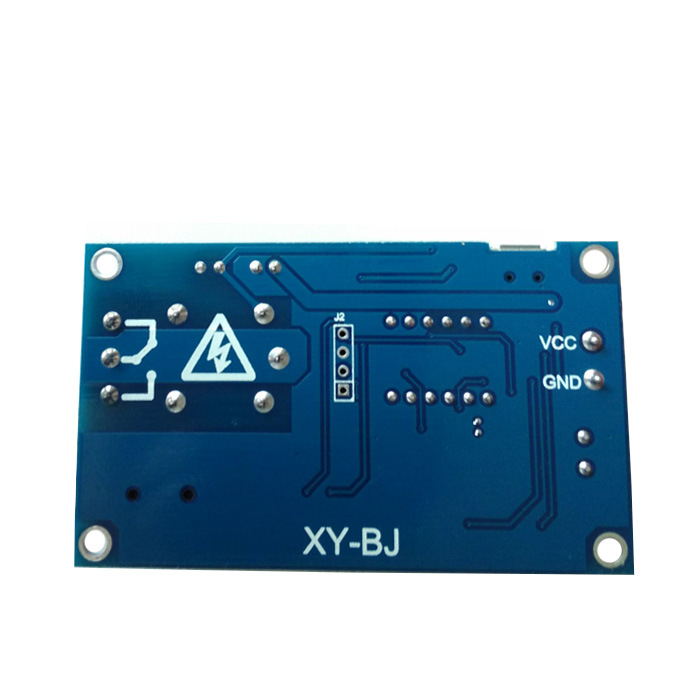
Why buy from us?
Lorem Ipsum is simply dummy text of the printing and typesetting industry.
Ask a Question About This Product
- Stock: In Stock
- Brand: OEM
- Model: RLMLS1082
- Location: https://detail.1688.com/offer/624422789952.html


Module highlights:
Wide voltage power supply5.0V--60V;
A mode can set multiple time periods, which canfiveA time period;
Equipped with buzzer alarm function.
Function mode introduction:
OPERelay closing timeCLERelay disconnection time
time slot:PE-1 to PE-5,fiveA time period
“----”:function masking
P-1:every dayOPERelay closed/output pulseCLERelay disconnection/输出脉冲
P-2:that dayOPERelay closed/output pulseCLERelay disconnection/输出脉冲
P-3:What month, what day:OPERelay closed/输出脉冲CLE Relay disconnection/输出脉冲
P-4:From what day of the month to what day of the month, what time does it start and end every dayOPERelay closed/输出脉冲CLERelay disconnection/输出脉冲
P-5:What day of each month does it start and endOPERelay closed/输出脉冲CLERelay disconnection/输出脉冲
Attention:stop time/date(CLE)> Start time/date(OPE)
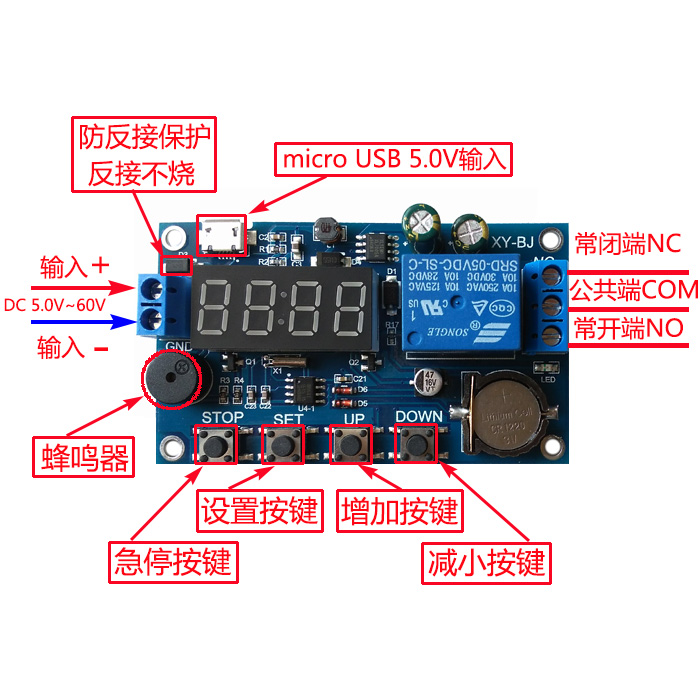
1、 How to set the time
In the time running interface, long pressDOWN:
oneSystem flashing display“YEA”After entering the time setting interface, the two digits after "year" will flashDOWN、UPAdjustment (supports long press);
twoshort pressSETSystem flashing display“dAE”Then enter the 'month'/On the "Day" setting interface, the "Month" keeps flashingDOWN、UPAdjustment (supports long press);
threeshort pressSETAt this moment, the 'sun' flashes, passing throughDOWN、UPAdjustment (supports long press);
fourshort pressSETThe system flashes and displays‘HOU’Afterwards, enterWhen/The 'minute' setting interface, at this time the 'hour' keeps flashing, throughDOWN、UPAdjustment (supports long press);
fiveshort pressSETAt this moment, the 'minute' flashes, passing throughDOWN、UPAdjustment (supports long press) Short press at this timeSETRepeat the stepsone;
sixlong pressSETAfter releasing it, the time will be modified according to the set parameters and the time setting interface will be exited;
IIHow to set parameters
In the time running interface, long pressSETkeytwoseconds laterRelease, the system enters the parameter setting interface:
Step: Select a time period:PE-1~PE-5By short pressingUP、DOWNKey selection;
Step 2: Select Mode:“----”P-1~P-5(That is, setting this time period to the corresponding mode)By short pressingUP、DOWNKey selection;(“----”Indicates blocking this time period)
Note:
The repetition pattern of each time period can be selected from "----", P-1~P5; For example, 5 time periods can work simultaneously in P-1 mode, or time period 1 can work in P-1 mode, time period 2 can work in P-2 mode, and so on; Very convenient and flexible, can be combined according to one's own needs;
Step 3:Mode selection completed, short pressSETEnter the time period setting interface,On the time slot settings interface, press a short buttonSET Switching parameters, “OPE”Starting time point “CLE”End time point “dAE"Date information;
Step 4: After completing the parameter settings, exit the settings,long pressSETkeytwoseconds laterRelease and check if the parameter settings are valid. If they are valid, save the parameters and return to the time running interface; If the parameters are incorrect, display“ERR”Reminder(stop time/日期 <=Start time/dateThen an error is reported)Return to the parameter setting interface again;
Attention:stop time/date(CLE)> Start time/date(OPE)
Additional features: Can be set separately at any time period
inspecificParameter setting interface(After the second step), short pressSTOPCan switch output modes:
OUT1Start by turning on the relay and end by disconnecting the relay
OUT2Time point output1Spulse
inspecificParameter setting interface(After the second step)Long pressSTOPYou can switch the ringing mode:
bLL0Ringing prohibited
bLL1: Ringing Enable
Note: After the bell rings, press any button to stop the current ringing
STOPButton function extension:
Relay enable mode:
1. ON :In the relayThe relay conducts during the conduction time;
2. OFFThe relay is prohibited from conducting and remains in a closed state at all times;
inTime display interfaceshort pressSTOPPress the button to achieveONandOFFThe switch between them will cause the current state to flash and then return to the main interface. (This function is an emergency stop function, a relay that can be opened and closed with one click)
After the relay is prohibited from conducting, setting the mode will activate the alarm function.
sleep mode:
1. C-PSleep mode: Within five minutes, the digital display will automatically turn off and the program will run normally;
2. O-dNormal mode: The digital display is always on;
在Time display interface,long pressSTOPbuttontwoRelease in seconds to achieveC-PandO-dSwitching states will cause the current state to flash and then return to the main interface.
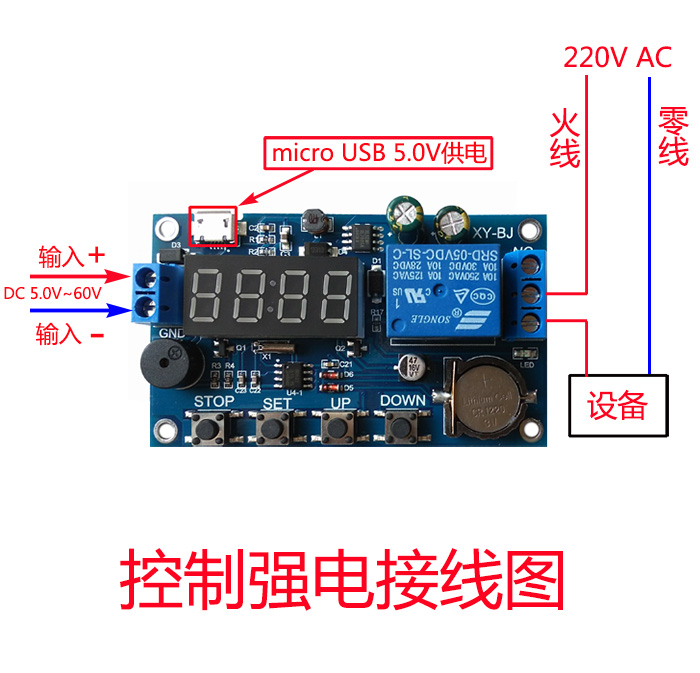
Module weight: 34g